
Designate Content For Proposal and/or Contract
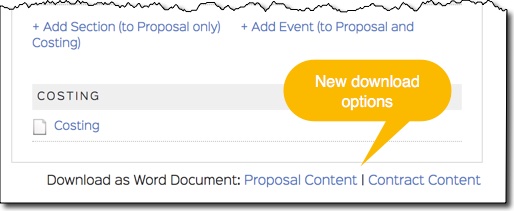
You'll notice new links at the bottom of the Proposal Table of Contents that allow you to download the "Proposal" or "Contract" content into a Word document. Before this update, there was a single download link that dumped ALL your proposal content into a Word document. Now, you can designate certain content to be included/excluded from the Proposal and included/excluded from the Contract.
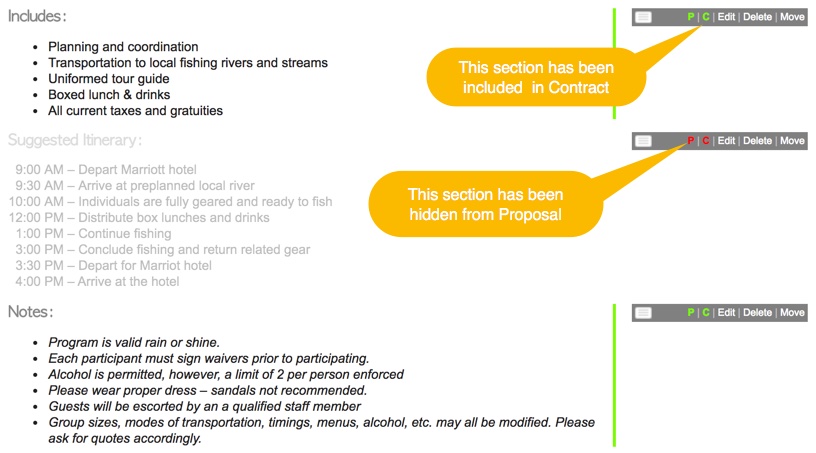
In addition to the new links on the Proposal Table of Contents, you'll notice two new "buttons" on Content Block handles that allow you to toggle each Content Block to be included/excluded from the Proposal and included/excluded from the Contract. By default, all content is included in the Proposal, so you can now hide content blocks from the Client proposal (Client Site and Word download) by "excluding" them from the proposal. By default, all content is excluded from the Contract, so you can now mark specific content to be "included" in the Contract (Word download and generated Contracts).
Proposal Builder Improvements
A few incremental improvements should make proposal building even easier and faster than before. For instance, the page no longer has to refresh every time you delete a Content Block or section. This allows you to delete Proposal content and keep working in the same area without having to wait for the page to reload.
We also added some view options to make lengthy proposal content easier to manage. The new view options include the ability to "collapse" proposal content (to make it easier to move the order of your content up and down) and the ability to show All Content, Proposal Content Only, or Contract Content only.

New Client View Options for Line Item Packages
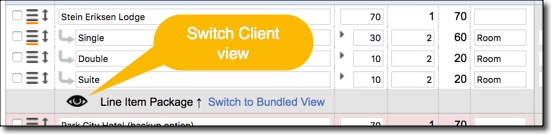
- Product Line Items Only (default): Show Client the pricing for all line items in package.
- Package Main Line Item Only: Show Client the pricing for package main line item only. This looks like a Bundled Package to the Client.
- Product and Package Line Items: Show Client the pricing for all line items in the package. This allows them to see pricing for each line item and overall cost for the entire package.
Has Internal Notes Indicator
Product / Package Details Popup
Costing Download
Commission Tracking
My/All Programs Downloads
The Programs List downloads have been updated with new columns: program id, third party company, status change date, billing percent paid, commission amount, management fee amount, all employee roles (6), URL link to program.
Comments
0 comments
Please sign in to leave a comment.