
When creating text content in Viper, you can choose from 5 font styles: 1 standard paragraph style and 4 heading styles. These fonts are customizable for EACH OFFICE, meaning you can have different font styles for each office (or brand) but the font styles are the same for all content in a single office. This allows for some flexibility across offices and brands, but also ensures content is consistent in each office.
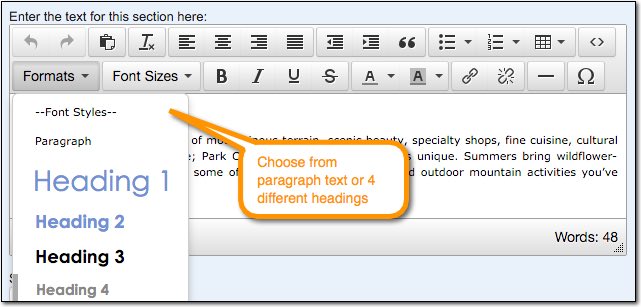
You can choose different font styles from the "Formats" menu when editing text content in the Content Library or in a proposal.
To customize fonts in your Content Library, follow the steps below:
- Download the Microsoft Word document attached to the bottom of this article.
- In the Word document, modify each font style to your liking. If you have more than one office and want each office to have unique styling, create a separate Word document for each office.
- It is possible to use custom fonts in Viper's web based proposals that are not supported by a standard Word template. In this case, you should still modify the Word template to be as close to your liking as possible, then specify the custom web fonts you wish to use in the Custom Web Fonts table in the Word document.
- Submit the modified Word document to Viper staff at support@vipeventresources.com.
Download Microsoft Word Template
Comments
0 comments
Please sign in to leave a comment.