
The Global Content Library allows you to share content (pricing and proposal descriptions) across offices, whether building proposals or working in the Content Library.
In the Content Library
In the Content Library tab, you can copy and move articles between offices. When copying (or moving) an article, you can select the destination Office from the dropdown menu in the upper left of the Content Library Picker.

In a Program
When working on a proposal or costing, you can add content and pricing from other offices. For instance, if you are working on a program in Office A (the office that owns the program), you can add content from the Content Library of another office, Office B.
To add content from Office B to the program you are working on in Office A:
First, make sure you select 1 or more destinations from Office B in the program's Details tab. Destinations can be selected under "Destinations" in the right column on the Details tab.
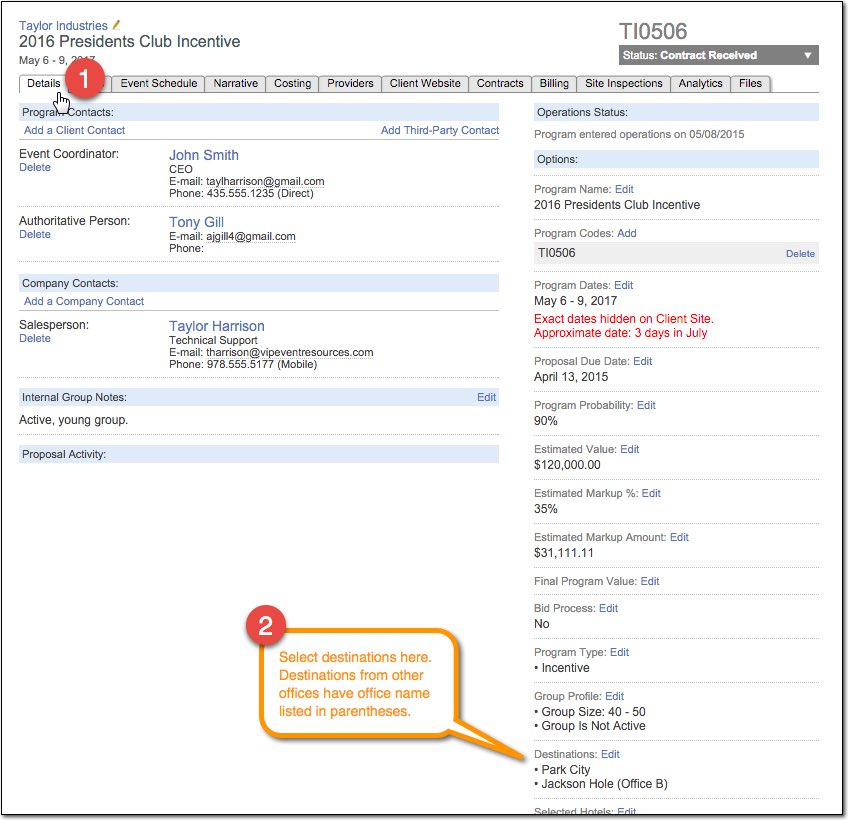
After selecting the desired destinations from Office B in the Details tab, you can add content and pricing to the program just as you normally would, but you can choose Office B from the office dropdown menu in the upper left of the Content Library Picker.

Comments
0 comments
Article is closed for comments.