
Use the Content Library (also referred to as "Tariff") in Viper to view content and pricing uploaded by Maritz approved suppliers for use by Maritz staff.
Content Library Basics
Viper's Content Library uses "Articles" to house content and pricing provided by Maritz approved suppliers. Within an Article, suppliers can provide information for their offerings, such as seasonal availability, the destinations the offerings are available in, proposal description, and pricing. In most cases, an article will contain a single attachment (like a Microsoft Word or PowerPoint document) that can be downloaded and viewed on your computer. If the Maritz approved supplier has provided a document to Maritz' specifications, the downloaded document should contain proposal description(s) and pricing.
Articles are organized by "Category." The list of Categories below was created by Maritz staff involved in developing the Maritz Viper Portal. Note that the number in brackets indicates the number of offerings for each category requested by Maritz.
- Activities [10]
- Calendar of Local Events [1]
- Decor Packages [3-5]
- Destination Information [1]
- Dine Around - Large Restaurant (100+ ppl) [10]
- Dine Around - Medium Restaurant (30-100 ppl) [10]
- Dine Around - Small Restaurant (10-30 ppl) [10]
- Entertainment [10]
- General Information [5-7]
- Local Staff [1]
- Room Gifts - High Budget [3]
- Room Gifts - Low Budget [3]
- Room Gifts - Medium Budget [3]
- Specialty Experiences [3]
- Specialty Items [3]
- Suggested Itineraries [3-5]
- Teambuilding [3-5]
- Transportation - Airport [1]
- Transportation - Around Town [1]
- Transportation - Charter [1]
- Venues - Large (100+ ppl) [3-5]
- Venues - Medium (30-100 ppl) [3-5]
- Venues - Off Site Restaurants [3-5]
- Venues - Small (10-30 ppl) [3-5]
Search for Articles
Remember that in the context of the Viper Maritz Portal, "Articles" contain the proposal content, pricing, and other details provided by Maritz approved suppliers. You can search for Articles in the Tariff tab.
When you first land on the Tariff page, no Articles are shown. You must click the [Search] button in the filter options area at the top of the page before you will see any Articles in the search results. Depending on what you are looking for, you can use all or none of the following search filters when searching for Articles.
- Supplier: Select one or more suppliers to limit your search results to only include the selected suppliers.
- Destinations: Select one or more destinations to limit your search results to only include Articles from suppliers that serve the selected destinations.
- Article Title: Enter text (such as "beach") to limit your search results to only include Articles that may have "beach" in their title.
- Tariff Category: Enter text from the categories list above (such as "decor") to limit your search results to only include articles in categories that contain the text "decor."
Click [Search] to show Articles that match your search filters.

Search results are organized by Supplier, then Tariff Category. Click on an Article title to view details and download any attached documents containing proposal descriptions and pricing.
If no Articles are shown in search results, there are no Articles in the Content Library that match your search crietria. Check your search filters and try again.
Show All Articles
To show all Articles, make sure you have no filters set (click [Clear Filter] button) and then click [Search] button.
Viewing Articles
Within an Article, you can view details like the destinations the Article is available in, seasonal availability, and when the Article was created and updated. In most cases, the Article will contain one or more file attachments in Word or PowerPoint format.
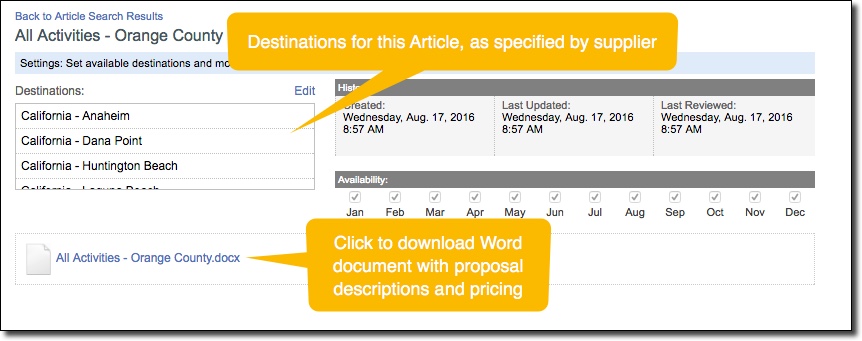
Click on an attachment to download the document that contains the proposal description(s) and pricing.
To return to the list of Articles from your last search, click the Back to Article Search Results link at the top of the Article.
Comments
0 comments
Article is closed for comments.