
Your pricing can be bulk loaded into Viper using our standardized Pricing Worksheet OR it can be entered directly into the Content Library. (If you need the Pricing Worksheet, please contact us at support@vipeventresources.com.) As you begin adding your pricing to Viper, it's important to understand how pricing is managed in Viper.
Pricing in Viper: Products and Packages
Pricing in Viper is managed using products and packages. A Product represents a single line items in a Costing (budget), such as a bus transfer or hourly staffing rate. A Package is made up of multiple Products, such as a City Tour that includes transportation, staffing, food options, entry fees etc. When you add a Package from your Content Library to a Costing, all of the Products in the Package are added at once.
Products
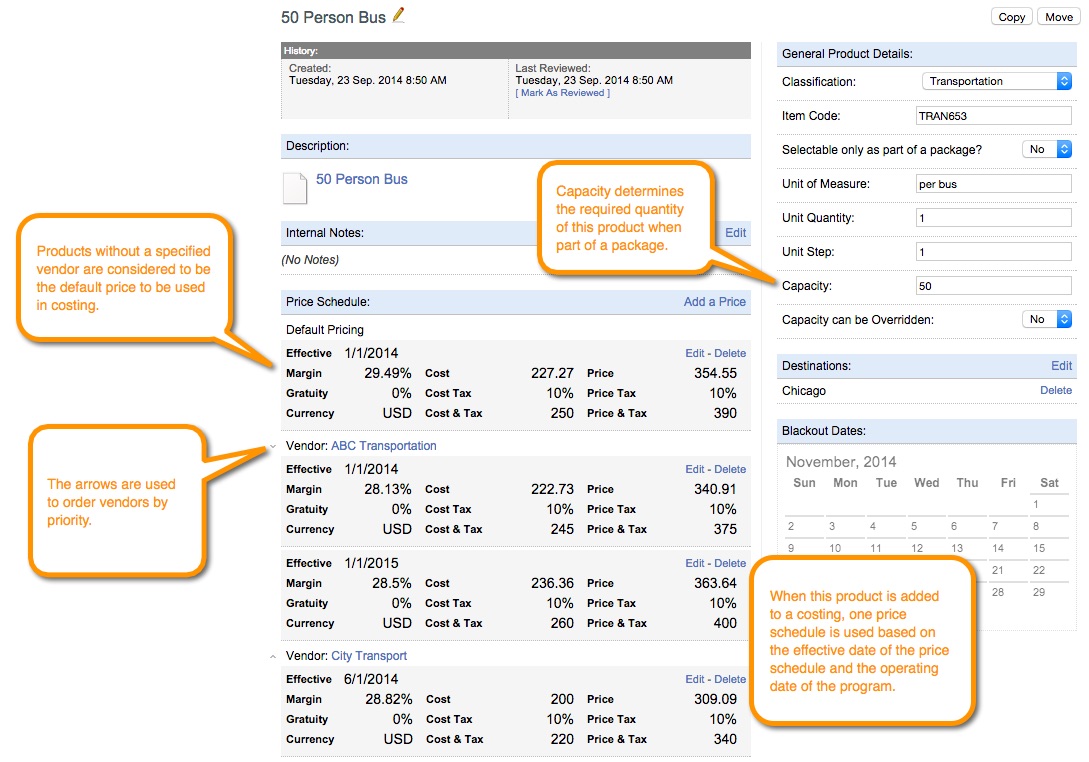
Products are stored in the Content Library and can have one or more "price schedules." A price schedule includes an effective date, price, cost, tax, gratuity, margin, comments, and you can even specify a provider if you like. In addition to price schedules, other information can be entered for a product such as unit minimum, capacity, classification, and unit description. Lastly, products can also have descriptions for use in the proposal. Even though a product can have multiple price schedules, only one price schedule is used when adding the product to a costing. The screenshot below shows a product called "50 passenger bus" with 4 price schedules.
IMPORTANT: Currently, the Pricing Worksheet only allows you to specify a single price schedule and provider for each product. After products are imported, you can add additional price schedules and specify additional providers directly in the Content Library.
Packages
As mentioned above, products can be used as standalone line items in a Costing or they can be used as building blocks for packages, which allow for more complex pricing. For instance, consider "50 person bus" as a single product that can be added to many other packages, such as a "Mountain Ski Tour" package, a skiing tour that includes transportation to and from the resort. The Mountain Ski Tour package can have several transportation options, plus guide fees, rental fees, etc. Packages are extremely powerful because they allow you to build flexible, comprehensive bundles of products AND they allow you to reuse the same instance of a product in as many packages as you need. When you need to update pricing for the "50 person bus," you update the price schedule in the "50 person bus" product and the pricing change is reflected in every package containing the "50 person bus."
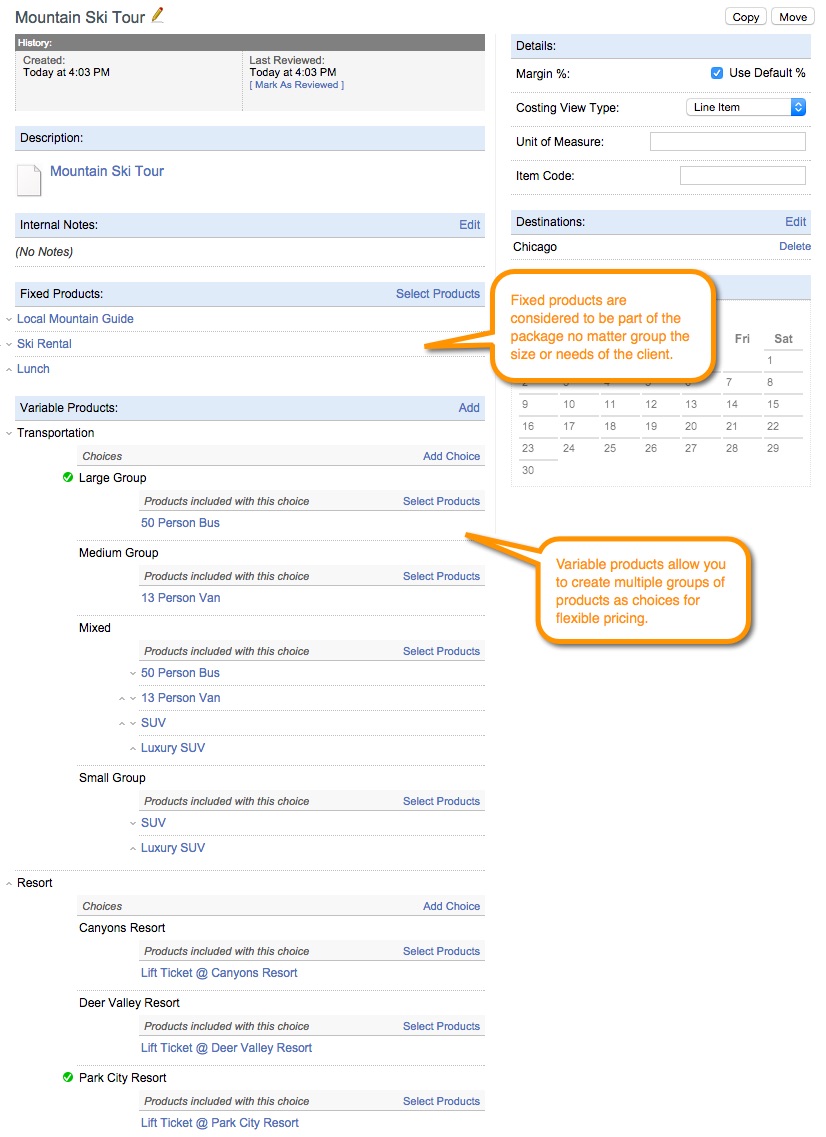
IMPORTANT: Packages must be built from products in the Content Library, meaning the products must be created before you can build packages. After products are imported from the Pricing Worksheet, they can be used to build packages directly in Viper. Click the [Select Products] button to add existing products from the Content Library as Fixed Products. To add flexible price options, click the [Add] button to create variable products (ie "Transportation") and then add one or more choices (ie "Large Bus", "Van", "Multiple Vehicles") to which you can add one or more products.
Packages in a Costing
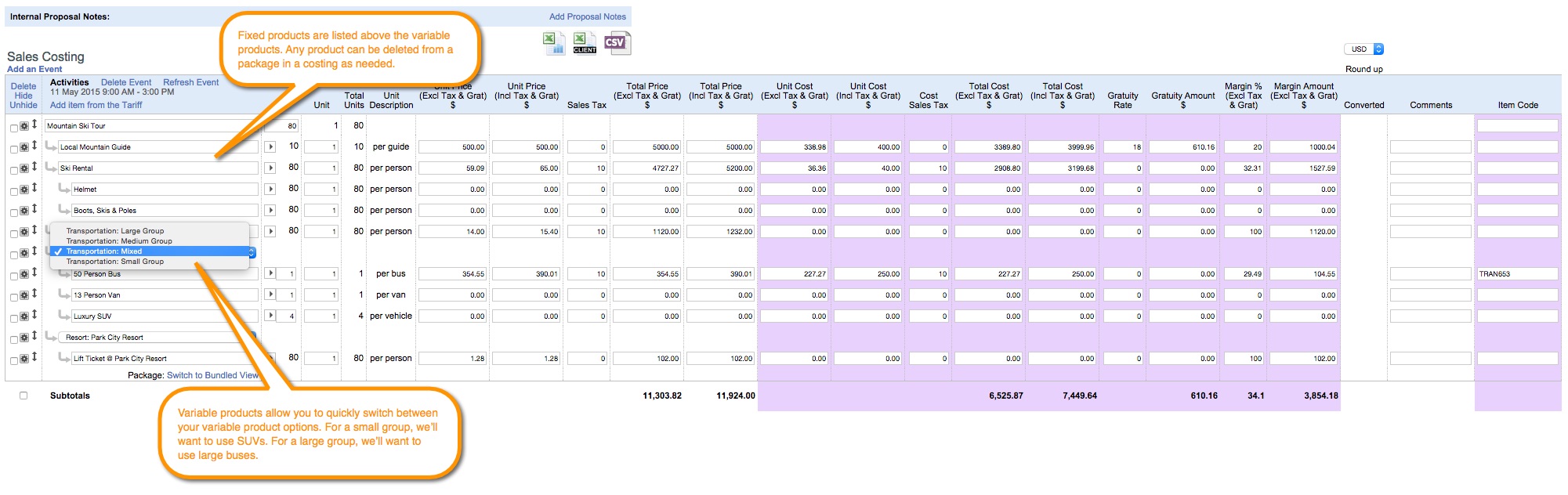
Now that we've covered adding products and building packages in the Content Library, let's take a look at what packages look like when they are added to a costing. Notice how quantities for each product in the costing are automatically calculated based on the package quantity and each product's capacity.

Fixed products are always shown. Variable products are shown based on the choice selected in the dropdown. Notice how we've changed the transportation option from Large Group to Mixed. Based on our choice, different products are displayed in the costing.
Pricing Summary
Now that you have a basic understanding of products and packages, let's review how pricing and content come together during data load process.
- Proposal content is loaded into the Content Library. Descriptions for content without pricing, such as Destination Experience, About our DMC, and Meet the Team, are loaded as standalone articles. Descriptions for content with pricing, such as Activities and Tours, are loaded as descriptions for packages. Initially, each package will only have a description and will have no pricing data until products are added to them.
- Products are created in the Content Library. Once you have completed the Pricing Worksheet, a member of the Viper team will upload the worksheet into Viper, where your products will be placed in a holding area. You will have an opportunity to review the uploaded products and add any missing information before you click the [Import Products] button, which pulls the products into the Content Library. Alternatively, products can also be entered directly into Viper's Content Library one at a time.
- Products are added to packages. Using the products in the Content Library, you can begin adding them to your packages to create pricing for your activities, tours, etc.
Note that the description for any article, product, or package can be copied or moved to any other article, product, or package at any point. This means that if an activity description was loaded into the system as a stand alone article, it can be copied into a package to be used as the package description.
IMPORTANT: Both products and packages can have descriptions. When a product or package is added to a specific program, obviously the pricing is added to the costing, but any description is also added to the proposal. In the case of packages, only the description for the package is pulled into the proposal, NOT the description(s) of the products in the package. For instance, the description of the 50 person bus will appear in the proposal when you add the 50 person bus as a standalone product for an in-town transfer. However, when a package containing the 50 person bus (such as the Mountain Ski Tour) is added to a program, only the description for the Mountain Ski Tour is pulled into the proposal. The detailed description of the 50 person bus product, and any other descriptions of individual products in the package, are NOT pulled into the proposal.
Comments
0 comments
Please sign in to leave a comment.